Integrate with CC Switch
CC Switch is a free, open-source cross-platform desktop app that centrally manages providers for AI coding tools such as Claude Code, Codex, OpenCode, and more. It lets you add, switch, and speed-test API providers from a single interface, and writes the tool's config file for you (e.g. ~/.claude/settings.json) — no manual editing required. Official website: ccswitch.io.
I. Prerequisites
Obtain your API Key from the LongCat Platform, and confirm on the Usage page that your account has sufficient token quota.
The LongCat API platform currently provides the following models:
| Model Name | API Format | Description |
|---|---|---|
| LongCat-2.5-Preview | OpenAI/Anthropic | High-performance agentic model |
| LongCat-2.0 | OpenAI/Anthropic | High-performance agentic model |
II. Install CC Switch
CC Switch supports Windows 10+ and macOS 12 (Monterey)+. Install it with a package manager or download it manually.
macOS
Homebrew (recommended):
brew install --cask cc-switchUpgrade later with:
brew upgrade --cask cc-switchOr download the .dmg from the Releases page and drag CC Switch.app into Applications. The macOS build is signed and notarized by Apple, so no extra security steps are needed.
Windows
Download the .msi installer (or the portable .zip) from the Releases page and run it.
Only download from ccswitch.io or the GitHub Releases. Any site asking for payment, top-ups, or login credentials is not official.
III. Add LongCat to Claude Code (Anthropic Protocol)
CC Switch adds LongCat to Claude Code via the Anthropic-compatible protocol and writes the configuration for you.
- Open CC Switch. In the app switcher at the top, select Claude (Claude Code).

Click the + button in the top-right corner to open the Add Provider panel, and keep the App-specific Provider tab selected.
In the Preset dropdown, choose Custom, then fill in the fields:
- Name:
LongCat - API Endpoint (
ANTHROPIC_BASE_URL):https://api.longcat.chat/anthropic - API Key (
ANTHROPIC_AUTH_TOKEN): your LongCat API Key - Model:
LongCat-2.5-Preview
- Name:
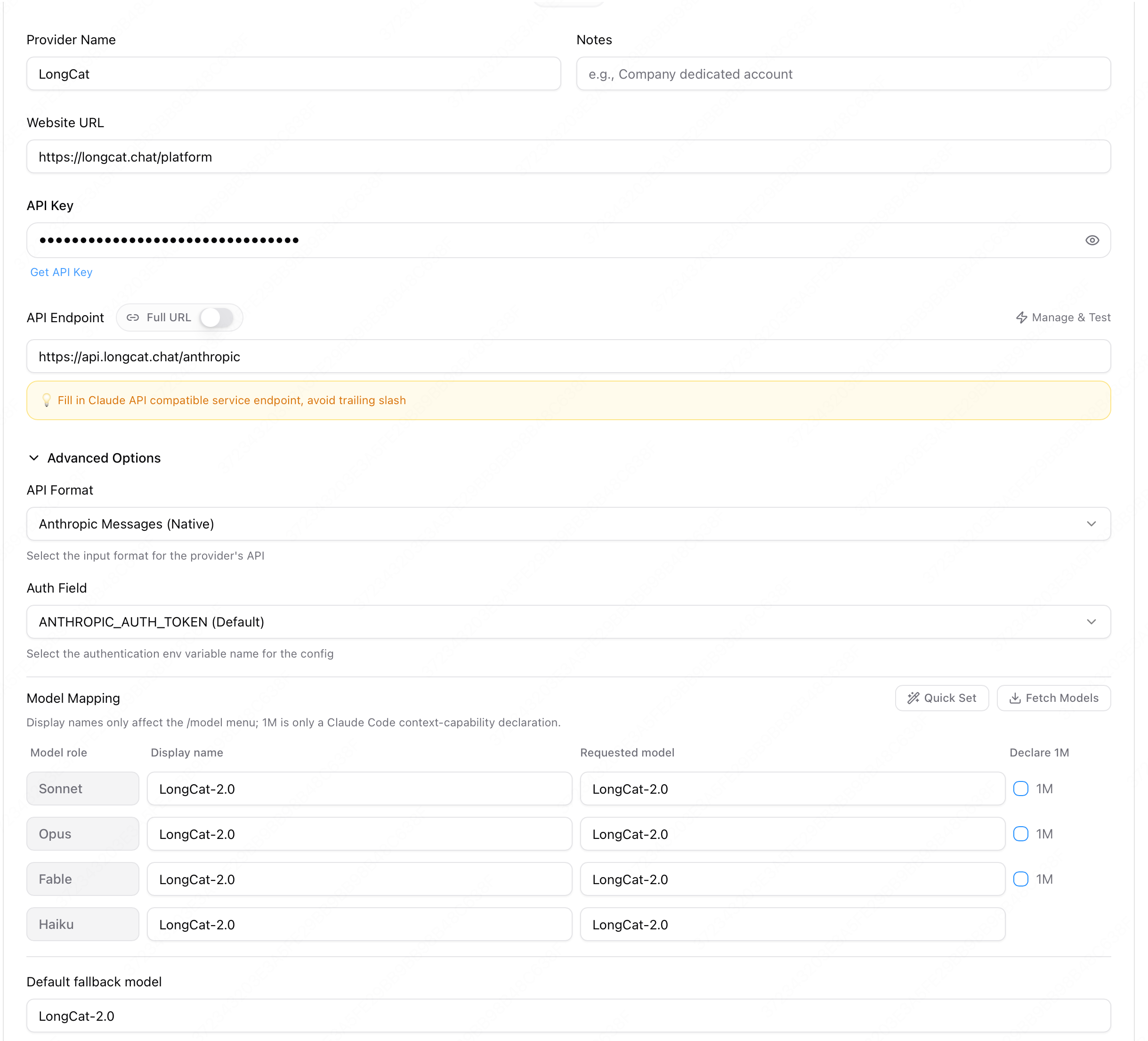
The API format stays on Anthropic Messages (the default for Claude). You can also click Fetch Models next to the model field to pull available models from the endpoint.
- Click Add to save. The resulting
~/.claude/settings.jsonwritten by CC Switch looks like:
{
  "env": {
      "ANTHROPIC_AUTH_TOKEN": "your_longcat_api_key",
      "ANTHROPIC_BASE_URL": "https://api.longcat.chat/anthropic",
      "ANTHROPIC_DEFAULT_FABLE_MODEL": "LongCat-2.5-Preview",
      "ANTHROPIC_DEFAULT_FABLE_MODEL_NAME": "LongCat-2.5-Preview",
      "ANTHROPIC_DEFAULT_HAIKU_MODEL": "LongCat-2.5-Preview",
      "ANTHROPIC_DEFAULT_HAIKU_MODEL_NAME": "LongCat-2.5-Preview",
      "ANTHROPIC_DEFAULT_OPUS_MODEL": "LongCat-2.5-Preview",
      "ANTHROPIC_DEFAULT_OPUS_MODEL_NAME": "LongCat-2.5-Preview",
      "ANTHROPIC_DEFAULT_SONNET_MODEL": "LongCat-2.5-Preview",
      "ANTHROPIC_DEFAULT_SONNET_MODEL_NAME": "LongCat-2.5-Preview",
      "ANTHROPIC_MODEL": "LongCat-2.5-Preview",
  }
}- On the LongCat provider card, click Enable. The card then shows a blue border and a Currently Enabled label.

IV. Add LongCat to Codex (OpenAI Protocol)
CC Switch can also manage Codex, which talks to LongCat over the OpenAI-compatible protocol. For Codex it writes ~/.codex/config.toml and ~/.codex/auth.json instead of ~/.claude/settings.json.
- In the app switcher at the top, select Codex.

Click the + button to open the Add Provider panel, and in the Preset dropdown choose Custom.
Fill in the fields:
- Name:
LongCat - Base URL:
https://api.longcat.chat/openai/v1 - API Key: your LongCat API Key
- Model:
LongCat-2.5-Preview
- Name:
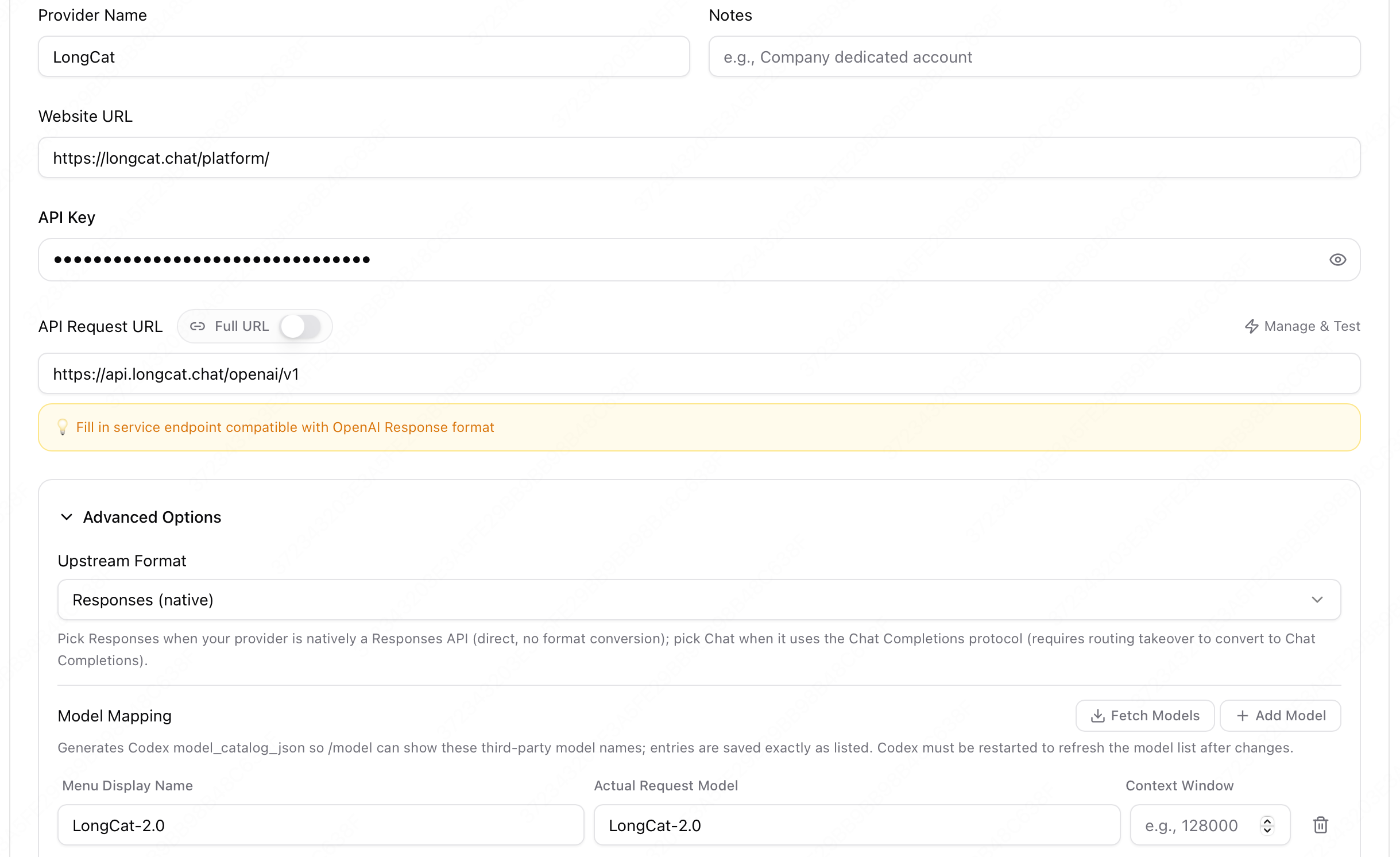
Keep the protocol on the default Native Responses (
wire_api = "responses"). LongCat supports the Responses protocol directly, so you do not need to enable Needs Local Routing.
Click Add to save. CC Switch writes the following files.
~/.codex/config.toml:
model_provider = "custom"
model = "LongCat-2.5-Preview"
disable_response_storage = true
web_search = "disabled"
model_reasoning_effort = "high"
model_supports_reasoning_summaries = true

[model_providers.custom]
name = "custom"
base_url = "https://api.longcat.chat/openai/v1"
wire_api = "responses"
requires_openai_auth = true~/.codex/auth.json:
{
  "OPENAI_API_KEY": "your_longcat_api_key"
}- On the LongCat provider card, click Enable.

V. Switch and Test
Claude Code supports hot reload, so after switching providers there is no need to restart your terminal — the change takes effect immediately.
Start Claude Code and send a test message:
claudeEnter a test message such as: "Hello, please introduce yourself". If the configuration is correct, you will receive a response from the LongCat model.
Codex does not support hot reload, so after switching providers restart Codex before sending a test message:
codexTip: Use the speed-test button on the provider card to check endpoint latency (🟢 <500ms / 🟡 500–1000ms / 🔴 >1000ms).
VI. FAQ
The provider does not take effect after enabling?
- Confirm the correct app (Claude Code) is selected in the top switcher, and that the LongCat card shows the Currently Enabled label.
- Verify
~/.claude/settings.jsoncontainsANTHROPIC_BASE_URL: https://api.longcat.chat/anthropic.
Authentication failure or 401/403?
- Verify the API Key is a valid LongCat API Key, and that you did not swap the API Key and Endpoint URL fields.
Model not found or 404?
- Verify the model is exactly
LongCat-2.5-Previewand the endpoint ishttps://api.longcat.chat/anthropic.
Codex provider not working?
- Confirm the top switcher is set to Codex, and that
~/.codex/config.tomlcontainsbase_url = "https://api.longcat.chat/openai/v1"withwire_api = "responses". - Confirm
~/.codex/auth.jsoncontains your LongCat API Key underOPENAI_API_KEY. - Restart Codex after switching providers so it reloads the config.